

Task 4: Using Photoshop/Illustrator produce a digital fashion illustration of your own design, printed out at A3 size and mounted up.
I didn't have a scanner to use, and I was using my partner laptop for working on adobe. (and I am a bit crap with his one!) So I have opted for downloading fabrics photos. Same for the blouse of the drawing I searched for a shiny golden fabric for a real look.

I used this for the blouse

I used this for the skirt

I used this for jacket & background
Here it is my process in Photoshop with all the screenshots and I added a digital frame on it.
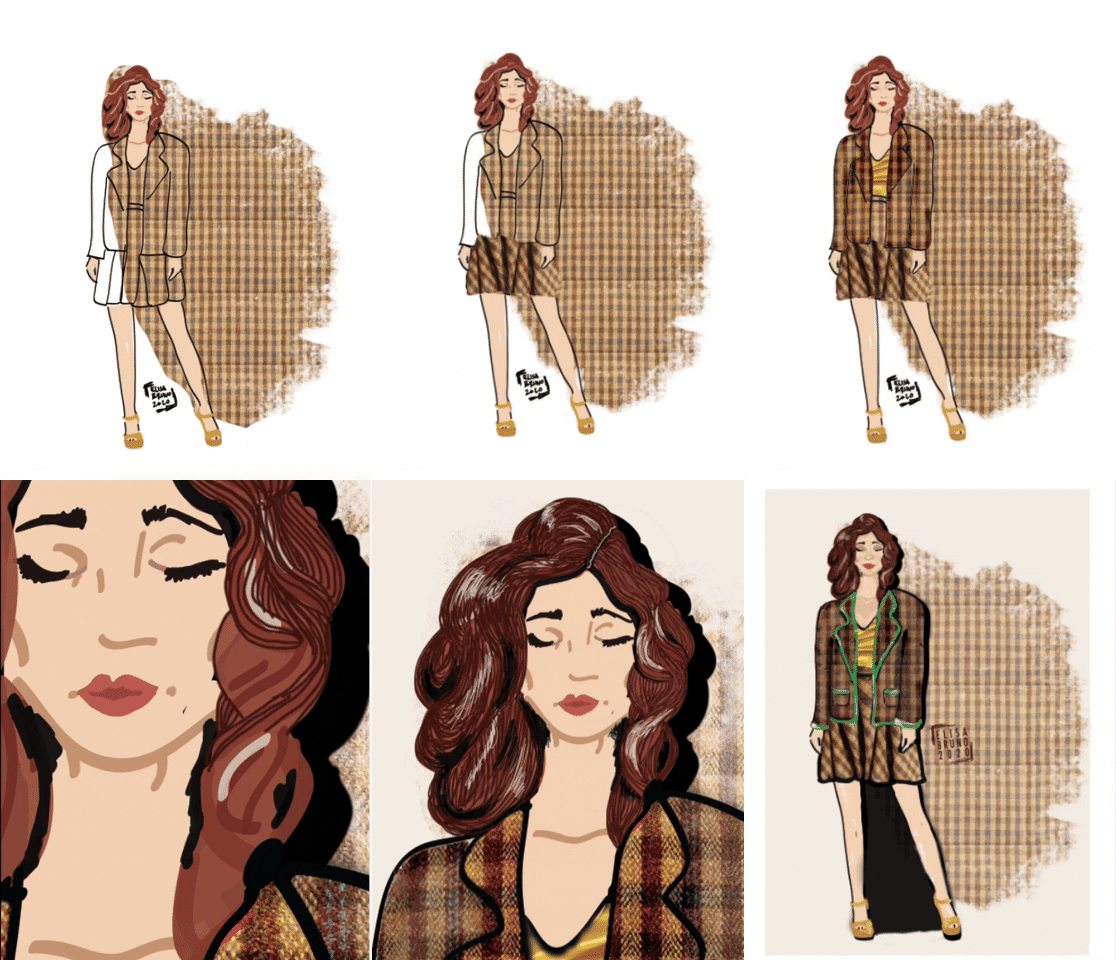
1.I have used a picture downloaded of the fabric of my choice and save it as a "Pattern". Then I made a shape form with the "Quick selection" tool and fill it with the pattern. Decreased the opacity of it, and used the tool Eraser in a natural style Brush version (not rubber) and I had erased some areas of the contour of the fabric pattern.
2. I had imported the PNG of my Illustrator vectors pic and put
it on top of the fabric level. I had copied the level and duplicated and
made it black (to give a sense of shadow)
3. I had imported the golden fabric photo and shaped into the
blouse shape.(I just quickly put it on another level and erased into
shape)
4. I had imported the other photo of the tartan fabric (the
one roughly folded) used "the lasso" tool and selected the shape that I
liked. I rotated the selection and put it on the skirt area of the
model.
5. I used different prospective of the same folded fabric pic and joined the selections together into a whole level. I have painted around with the brush some shadows between plates and bottom of the skirt.
6.I have used the tool "Brush" and the tool "Smudge" for all the details on the face. Every parts (shadows-lights-makeup etc.) are on different levels.
7.I have used different sizes & colours "Brushes" for the hair. Divided into different levels for each colour.
8 I had selected different parts of the jacket (first front, then sleeves and then the lapels of it) and fill each one with the pattern. Then I have used the tool "burn" to darken some part of the jacket and to give a more dimensional look.
9. I have coloured the shoes with brush and add splashes of similar shades of golden. I have typed my sign with the tool "Type" and add some decoration with a fine brush.
10. I finished adding some green details with the brush again. I add a frame and exported into a JPEG format.
The green at end results a bit to... shocking....! ahahaha I wanted more a kind of emerald one! But still OK! I am pretty happy about the results! I definately still have problems with the use of lights and shadows, I should study more on it!
Now I just need to print it out! The final project it's ready!
Comments
Post a Comment
Be kind!